Workshops
Run parallel sessions safely with capacity and eligibility. Tags gate access; self‑registration speeds fill; logs and exports keep it accountable.
Create and manage event sub-sessions with schedules, venues, capacities, and tags. This module also supports guest self-registration and workshop registration management.
Overview
Workshops are event sub-sessions such as breakouts, tracks, or trainings. Each workshop has its own schedule, venue, capacity, and allowed tags. This guide covers creating, editing, deleting, restoring, permanently deleting workshops, enabling guest self-registration, and managing registrations.
Interface Preview
Quick Start
- Go to Event > Workshops.
- Click Create Workshop and fill in:
- Title
- Venue
- Start and End dates/times
- Capacity
- Tags
- Description
- Save. Workshop appears in the list.
- Use row actions to Edit, Delete (soft delete), Restore, or Permanently Delete.
- Share the registration link to eligible guests via RSVP/email.
- Manage registrations via Event > Workshop Registrations.
Navigation
- Manage workshops: Event > Workshops
- Manage registrations: Event > Workshop Registrations
- Create workshop: Event > Workshops > Create Workshop
Times are stored in the event’s timezone but displayed in your preferred timezone for clarity.
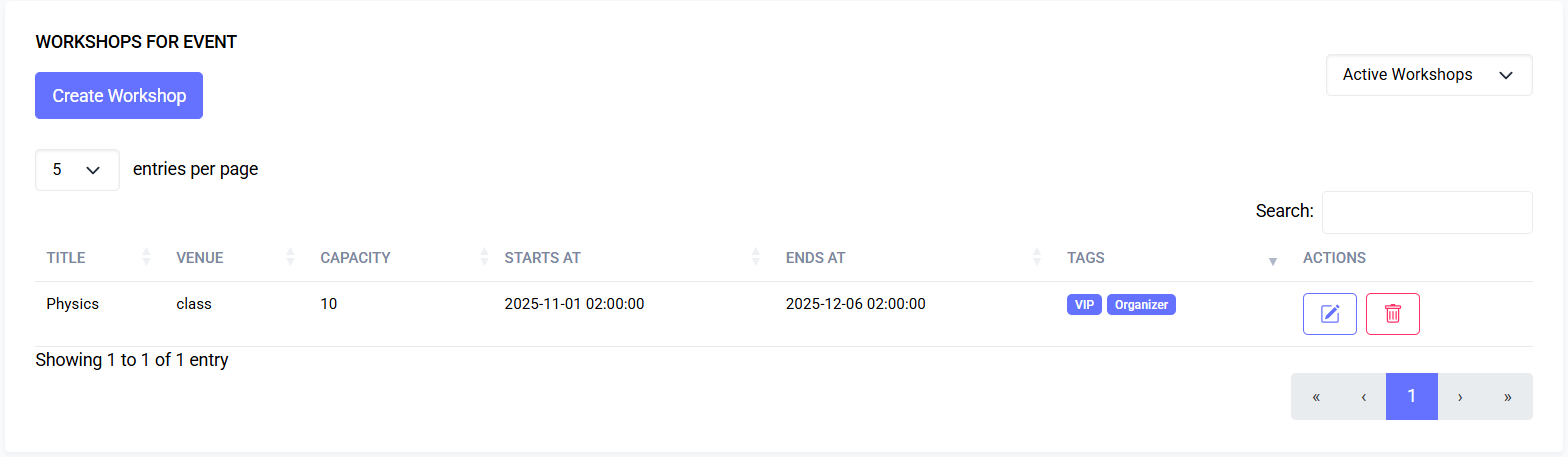
Workshops List
- Columns: Title, Venue, Capacity, Starts at, Ends at, Tags, Actions
- Filters: dropdown for Active, Deleted, All Workshops
- Deleted entries: greyed with Deleted badge
- Tags: displayed as badges
- Capacity: number or Unlimited
Screenshot: Workshops List
Actions
- Edit: opens the edit form
- Delete: soft-delete
- Restore: restore a deleted workshop
- Permanently Delete: irreversible, only for trashed workshops
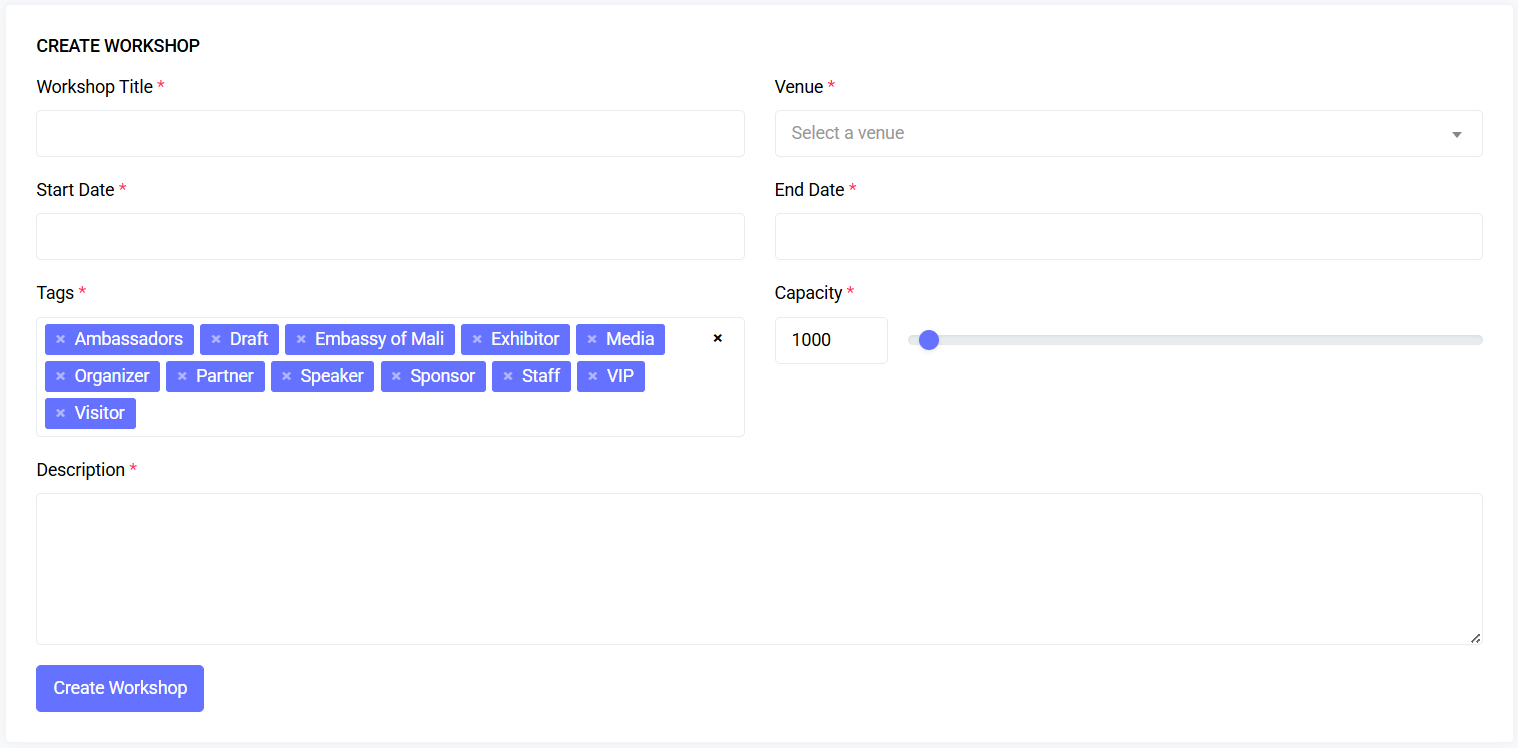
Create / Edit Workshop
Fields
- Title: required, unique per venue
- Venue: required, pick from event’s venues
- Start/End Date & Time: required; End must be after Start
- Tags: required; one or more event tags
- Capacity: 10–50,000; numeric + slider input
- Description: required, up to 2000 characters
Screenshot: Create Workshop
Validation & Constraints
- Schedule conflicts are checked
- Capacity cannot be lower than existing registrations
- Title uniqueness scoped to venue (active records)
Timezone Behavior
- Stored in event timezone; displayed in user’s preferred timezone
Delete / Restore / Permanently Delete
- Delete: moves workshop to trash (soft delete)
- Restore: available for trashed items
- Permanently Delete: irreversible, only for trashed items
Guest Self-Registration
Access
- Guests receive a secure tokenized link (per guest, per tag)
- Only workshops matching guest tags are shown
Page Layout
- Date rail: buttons per day with workshops
- Past date banner: indicates past dates
- Workshop cards: time range, title, venue, description toggle, and button
Buttons
- Register: future session, eligible guest, not full
- Registered: disabled if already enrolled
- Full: disabled if capacity reached
- Past: disabled for past sessions
Registration Flow
- Clicking Register confirms action, creates registration, disables button
- Errors: already registered, workshop full, unexpected issues
Workshop Registrations Page
Location: Event > Workshop Registrations
Features
- Filters: by workshop, Active/Deleted/All
- Exports: CSV, Excel, PDF, Print (Actions column omitted)
- Columns: Guest, Email, Workshop, Status, Actions
- Deleted rows: greyed; deleted guests indicated
- Status badges: registered, pending, cancelled
Actions
- Delete (soft)
- Restore
- Permanently Delete (trashed only)
Permissions
Workshops
| Action | Permission |
|---|---|
| View list | workshop.viewAny |
| Create | workshop.create |
| Edit / Update | workshop.edit |
| Delete (soft) | workshop.delete |
| Restore | workshop.restore |
| Permanently delete | workshop.forceDelete |
Workshop Registrations
| Action | Permission |
|---|---|
| View list | workshopRegistration.viewAny |
| Delete (soft) | workshopRegistration.delete |
| Restore | workshopRegistration.restore |
| Permanently delete | workshopRegistration.forceDelete |
If actions are missing, your role may not have the corresponding permission.
Troubleshooting
| Issue | Likely Cause | Fix |
|---|---|---|
| Can’t create/update | Validation errors (Title, dates, capacity, tags, description) | Correct errors and resubmit |
| Times look wrong | Event vs user timezone | Check event and profile timezone |
| Guests can’t register | Session full, past, or missing tag | Verify eligibility and capacity |
| Export buttons missing | Table not fully loaded | Reload page or wait for table initialization |
FAQs
- Can guests switch workshops?
Remove from old workshop, register for new if capacity allows - Do tags control registration?
Yes, guests must match at least one tag - Can I reduce capacity below current registrations?
No, system prevents lowering below existing registrations - Can I bulk export registrations?
Yes, via Event > Workshop Registrations
Last updated: 2025-10-09